DriveCSX: Car Crash Simulator
- 4.6
- Rating
- 10.00M
- Installs
- Free
- Price

 Analysis by App-foxy
I approached DriveCSX Car Crash Simulator as a game to explore rather than a traditional racing challenge. Its appeal is not simply reaching a finish line first. The interesting part is setting up a vehicle, choosing how to drive, and watching realistic-looking soft-body physics react when things go wrong. That makes it a simulation game with a very different rhythm from an arcade racer: short experiments, repeated attempts, and plenty of time spent learning how small changes affect the result.
After spending time with it, I think it works best for players who enjoy vehicle behavior, controlled crashes, and testing ideas. It is free to download, aimed at Everyone, and developed by Studio WW Games. The game has attracted more than ten million installs, with an average rating of 4.1 from roughly eighty thousand ratings and about two thousand four hundred written reviews. Those figures suggest a broad audience, but they do not change the main point: this is a niche kind of driving game, and its value depends heavily on whether you enjoy experimentation more than conventional competition.
How I built a reliable driving routine
I get the most consistent results when I treat each drive as a small, repeatable test rather than a hunt for a spectacular wreck. This section looks at how I choose a baseline, keep sessions focused, and make ordinary play time useful; next, I turn to the controls and visual choices that can make that routine more comfortable.
You May Also Like

 Blood Strike: 2.5 Anniversary
Blood Strike’s Loadouts Turn Every Drop Into a Tactical Gamble
A close look at Blood Strike’s custom loadouts: how fast access to signature weapons reshapes its battle royale rhythm, rewards preparation, and narrows the gap between fights.

 Pandora - Music & Podcasts
Pandora’s Music Is Easy to Start, but Harder to Recover
Pandora’s strength is its low-effort path from a seed to a station. Its weak spot is how much confidence it asks you to place in connection, setup, and quiet recovery.

 8 Ball Pool
 Is Built on Rivalries, Rematches, and Routine
A close look at the rivalries, rematches, shared routines, and unanswered safety questions that turn a quick pool match into a persistent mobile community.

 Samsung Music
’s Quiet Strength Is Playing What You Already Own
Its reach comes less from spectacle than from dependable access to a personal library. That simplicity is both the app’s strongest retention engine and its ceiling.

 AccuWeather: Weather Radar
AccuWeather Review: A Quick, Clear Forecast for Everyday Decisions
For everyday plans, the best forecast is the one you can understand quickly. AccuWeather makes rain timing, radar, and local conditions easy to act on, with a few trade-offs.

 Hill Climb Racing
Why Hill Climb Racing Still Turns Crashes Into One More Run
A tiny car, a bumpy hill and one more upgrade: Hill Climb Racing keeps resurfacing because its simple chaos makes every near-miss feel personal.
More From Our News Desk



Starting with a baseline instead of chasing spectacular crashes
My first useful habit was to avoid changing several things at once. I began with a simple drive, using the default setup and paying attention to how the vehicle responded under ordinary steering, braking, acceleration, and contact with obstacles. That baseline matters because a crash can look dramatic while still teaching you very little. If the vehicle behaves differently after every adjustment, it becomes difficult to know which change caused the result.
A better routine is to repeat the same basic maneuver several times. I used a straight approach, a turn, and a controlled impact as separate tests. The goal was not to produce the biggest wreck immediately, but to notice whether the car remained predictable. Once I understood that behavior, I could try a different angle or speed and compare the outcome. This makes the game feel less random and more like a small physics laboratory.
That approach also helps with the biggest temptation in a crash simulator: restarting too quickly. A failed attempt can reveal useful information about steering timing, braking distance, and how much control remains after contact. I found that watching the full result before resetting often taught me more than trying to correct the vehicle in the middle of a chaotic moment.
Using ordinary play sessions as repeatable tests
A realistic everyday scenario is a short session after work or during a break. I would choose one vehicle, give myself one simple objective, and repeat it for a few minutes instead of jumping between every available possibility. For example, I might practice approaching the same obstacle from different angles, first with a gentle correction and then with a sharper turn. This keeps the session focused and makes progress easier to recognize.
For a longer session, I would divide the time into three stages. First, I would drive without experimenting to establish how the vehicle feels. Next, I would change one part of the setup or driving approach. Finally, I would return to the original behavior and see whether the difference was real or simply caused by a different line. This workflow is especially useful for players who want to understand the simulator rather than merely collect entertaining crashes.
The game rewards patience because the same action can produce a different-looking result when the approach is slightly altered. That is not necessarily a flaw. It is part of the attraction, although players expecting perfectly repeatable arcade handling may find the process less satisfying.
Why the physics are the main reason to stay
The soft-body physics give impacts more visual interest than the fixed animations common in simpler driving games. A collision feels like an event that changes the vehicle rather than a single canned effect. I enjoyed looking at the aftermath and considering what the impact angle had changed. The damage itself is not the only reward; the useful question is why the vehicle ended up in that state.
Still, realistic physics do not automatically make every moment realistic or enjoyable. A simulation can become frustrating when the player cannot tell whether a result came from a deliberate input or an unpredictable chain of movement. DriveCSX is strongest when I treat it as a sandbox for controlled tests. It is weaker when I expect the precision and immediate feedback of a competitive racing game.
Settings and controls that deserve attention
Control feel can shape a result as much as the vehicle itself, so I would check how steering and camera perspective work for me before changing several things at once. I also consider whether a short session is easier to manage on my particular screen and device. The next section focuses on making each attempt more informative, not just more dramatic.
Check the control feel before judging the vehicle
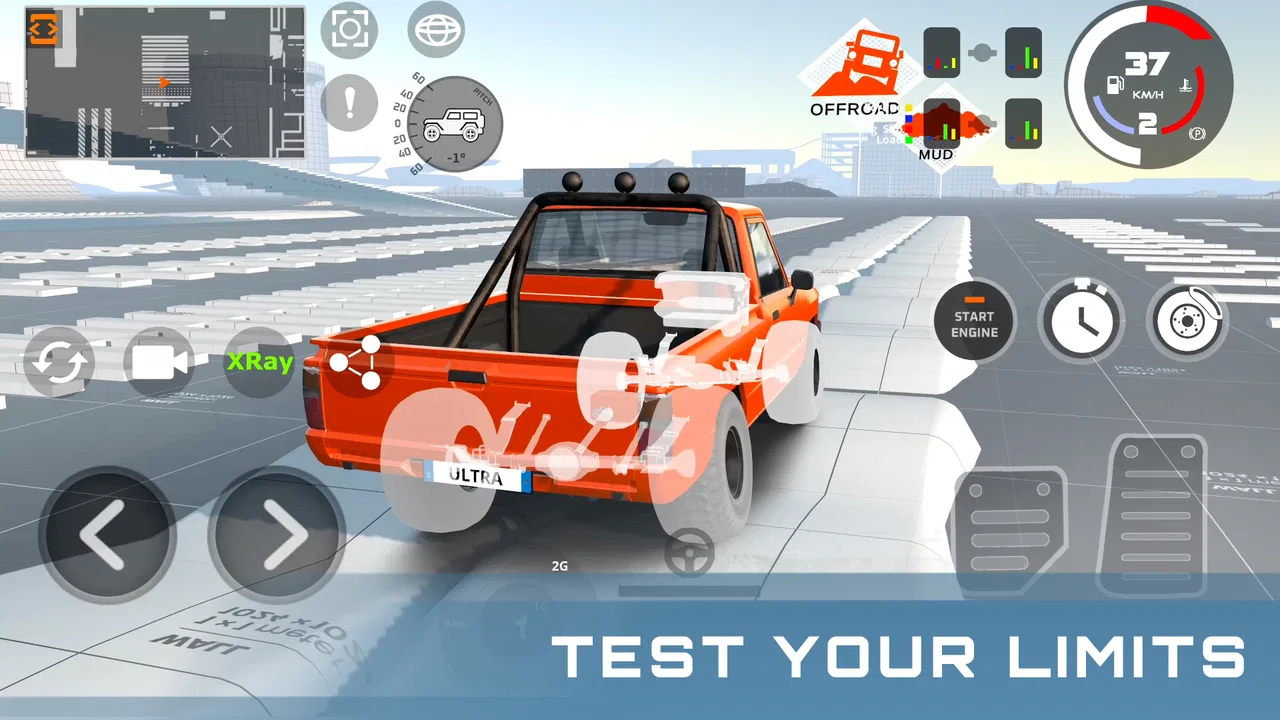
Before deciding that a car handles badly, I recommend checking how the controls feel in your hands. Touch driving can make a vehicle seem more nervous or less responsive than it really is, especially when a small thumb movement creates a large steering correction. I found it more useful to make gentle inputs and observe the response than to hold a direction continuously and then blame the physics for an overcorrection.
Players should also give themselves a short adjustment period when switching between vehicles or situations. A control style that works for a broad turn may be too aggressive near an obstacle. I learned to use smaller corrections as the vehicle approached a collision point, then allow the physics to complete the movement instead of fighting every change.
That habit is one of the easiest ways to make the game feel more consistent. It does not add a new feature, but it changes how much information you get from each attempt. If you steer constantly, you may never see the vehicle’s natural response. If you release or reduce the input at the right moment, the behavior becomes easier to read.
Look for a comfortable visual setup
Camera position is important in a game built around judging distance and impact angle. A view that looks exciting may not be the best one for precise driving. I preferred a perspective that let me see enough of the vehicle and the space immediately ahead, because that made it easier to line up repeatable tests. For dramatic crashes, a different view can be more enjoyable, but I would not use spectacle as the main camera while learning.
It is also worth checking whether visual effects make it harder to judge movement. When the screen becomes busy during an impact, I found it more productive to replay the approach mentally and focus on the moments just before contact. The important decision usually happens before the crash, not during the most visually intense part.
Because the game is available for devices running Android 7.0 or later, compatibility is broad, but that does not mean every phone will feel identical. Screen size, touch sensitivity, and general device performance can affect comfort. I would test a short session before committing to long experiments, especially if your phone has a small display or struggles with visually demanding games.
Spend carefully rather than assuming purchases are necessary
The game is free, with in-app purchases ranging from $3.99 to $9.99 per item. I would treat those purchases as optional until the basic driving loop has earned your interest. A player who enjoys the physics with the initial experience can decide later whether extra content or convenience is worth paying for. Someone who already dislikes the handling will not solve that problem simply by spending more.
This is also where the game differs from a conventional premium racing title. A paid racer may offer a more structured progression from the beginning, while DriveCSX places more emphasis on the immediate sandbox experience. The free entry point is useful for testing whether this style suits you, but the presence of optional purchases means I would set a personal spending limit before exploring them.
Use settings to protect the experiment
Experienced players often make their sessions easier to compare by keeping their chosen view and controls consistent. I recommend changing only one setting between tests and returning to the baseline when a result seems confusing. This is more valuable than constantly searching for a perfect configuration, because a comfortable setup is one you can reproduce.
Another practical tip is to separate learning settings from viewing settings. For learning, choose whatever makes steering and distance clearest. For screenshots or dramatic replays, choose the view that best shows the damage. Mixing both purposes can lead to a setup that looks impressive but makes accurate driving harder.
Faster patterns for getting more from each attempt
When time is limited, I try to give each run one clear purpose and change only one part of my approach. That makes it easier to tell whether speed, steering, or timing was responsible for a different outcome. I’ll build on that method with practical patterns for reducing unhelpful repetition before considering what the simulation cannot provide.
Use short runs with one question
The fastest way I found to improve was to give every run one question. Do I need to brake earlier? Does a wider approach reduce the severity of the impact? Does a smaller steering input keep the vehicle stable after contact? A question like this turns a random crash into a test with a result.
This method also prevents a common waste of time: repeating an attempt without changing anything meaningful. If the result is identical, I either adjust the approach or stop and review what happened. Repetition is valuable only when it reveals a pattern.
Separate approach speed from steering technique
When an impact goes badly, it is tempting to blame the steering immediately. In practice, approach speed can be just as important. I learned to test a slower approach before making a major steering change. If the vehicle becomes easier to control, then the original problem may have been too much momentum rather than poor turning.
Once the speed feels manageable, I can compare steering lines. A gentle arc, a late correction, and a direct approach each produce different information. This is a more efficient workflow than trying to combine maximum speed, sharp steering, and a new camera view in the same run.
Let the vehicle settle before making a second input
One of the more useful habits is to avoid stacking inputs too quickly. After a collision or abrupt turn, I give the vehicle a moment to settle before attempting another correction. Rapidly alternating between steering and acceleration can make the result difficult to interpret, particularly when the vehicle is already moving unpredictably.
This does not mean driving slowly all the time. It means choosing the moment when an input will provide clear information. A short pause can show whether the vehicle is naturally recovering or whether it needs intervention. That distinction helps me avoid turning a manageable situation into a second, unnecessary crash.
Review the setup, not just the wreck
The most entertaining result is not always the most useful one. I started judging attempts by whether I could explain them afterward. If I could say that a particular angle, speed, or correction caused the vehicle to react in a certain way, the run was successful even if the crash looked ordinary.
This mindset is especially helpful for younger players or anyone sharing the game with friends. Instead of competing only to create the biggest destruction, you can compare approaches and discuss why the vehicles reacted differently. The Everyone age rating makes it approachable, but younger players may still benefit from guidance about optional purchases and from short sessions that keep the experimentation focused.
Where the simulation reaches its limits
A physics-focused sandbox can make collisions compelling, but it is not automatically the right fit for every driving-game player. Here I look at where open-ended experimentation gives way to friction, especially for anyone seeking predictable racing or a guided sequence of goals. The following section puts those limits into context and helps identify who may prefer another kind of game.
It is not the best choice for structured racing
If your main goal is close competition, lap times, career progression, or a clear sequence of events, a conventional racing game will probably suit you better. DriveCSX is built around vehicle simulation and crashes, so its strongest moments come from open-ended testing rather than a tightly directed race weekend.
That difference is important before downloading. I would recommend it to someone who enjoys asking “what happens if I try this?” I would not recommend it as the first choice for a player who wants polished competitive races, predictable handling, or a long campaign that constantly introduces new objectives.
Realistic-looking physics can create friction
The same physics that make impacts interesting can also make control feel uneven. A small mistake may have consequences that are difficult to correct, and a player who expects every input to produce an immediate, clean result may become impatient. I sometimes had to accept that an attempt was no longer recoverable instead of forcing a dramatic save.
This is a trade-off rather than a simple defect. More forgiving handling would make the game easier to play, but it could reduce the value of testing different approaches. The right choice depends on what you want from the simulator. I enjoyed the uncertainty when I was experimenting; I found it less welcome when I wanted a quick, precise challenge.
Free access does not remove the need for restraint
The free price makes trying the game straightforward, but players should still decide whether the basic experience is enough before considering the available purchases. The listed purchase range is not extreme compared with many mobile games, yet the best value depends on how often you return. If you play only for occasional crash experiments, paying may not be necessary. If the physics sandbox becomes a regular hobby, you can judge the optional items from that longer-term use.
I would also avoid treating the install count or rating as a guarantee that the game will match your preferences. A 4.1 average is encouraging, and the large audience shows that the concept has reach, but simulation games divide players more sharply than straightforward arcade titles. Some will love the freedom; others will find the lack of structure tiring.
Who should skip it
I would skip DriveCSX if you dislike restarting experiments, adjusting to touch controls, or learning from results that are not immediately repeatable. It is also a poor fit if you want a calm driving experience without collisions, because destruction is central to the game’s identity rather than an occasional side activity.
I would be cautious if your device is older or your display makes touch driving uncomfortable. The minimum operating system is Android 7.0, but technical compatibility is only one part of the experience. A game that depends on visual judgment and responsive controls needs to feel comfortable on your particular phone.
My verdict after learning its rhythm
DriveCSX Car Crash Simulator works best when I stop treating it like a normal racer and start treating it like a repeatable vehicle experiment. The strongest workflow is simple: establish a baseline, check the control and camera setup, change one factor, repeat the same approach, and watch the full result before restarting. That routine turns short sessions into something more rewarding than random destruction.
Its main strength is the way soft-body physics make collisions worth examining. Its main limitation is that the same unpredictability can frustrate players who want clean, competitive control. The game also asks users to create their own structure, so it may feel thin if you need constant objectives or a defined progression path.
For me, the best use case is a focused ten-minute experiment: choose one vehicle, test one approach, adjust one setting, and compare the outcome. That is where the game’s character becomes clear. It is not trying to replace every driving game on a phone, and it should not be judged by the standards of a traditional racing campaign.
Studio WW Games has made a free simulation game that is easy to try and surprisingly deep when approached patiently. The current version is 0.91, and I would view it as a game to revisit as long as the physics sandbox continues to hold my attention. If you enjoy vehicle behavior, controlled destruction, and learning through repetition, DriveCSX Car Crash Simulator is worth installing. If you want fast races, fixed rules, and immediate mastery, I would point you toward a more conventional alternative instead.
FAQs for DriveCSX: Car Crash Simulator
01What is DriveCSX Car Crash Simulator and how does it work?
DriveCSX Car Crash Simulator is a realistic simulation game that allows users to experience car crashes in a controlled environment. Players can choose from a variety of vehicles and crash scenarios to test the effects of collisions. The game uses advanced physics to provide a detailed analysis of each crash, offering insights into vehicle dynamics.
02Is DriveCSX Car Crash Simulator free to download and play?
DriveCSX Car Crash Simulator offers a free version with basic features and levels. However, to access more advanced vehicles, scenarios, and features, users may need to make in-app purchases. The free version provides a great introduction to the game, allowing players to decide if they want to invest in additional content.
03What devices are compatible with DriveCSX Car Crash Simulator?
DriveCSX Car Crash Simulator is available for both Android and iOS platforms. It requires Android version 5.0 or higher, and iOS version 11.0 or later. The game is optimized for both smartphones and tablets, providing a seamless experience across different screen sizes.
04Does DriveCSX Car Crash Simulator require an internet connection?
DriveCSX Car Crash Simulator can be played offline, allowing users to enjoy the game without an internet connection. However, certain features, such as leaderboards and cloud saves, require an internet connection to function. It's advisable to connect periodically to ensure your progress is saved online.
05Are there any safety concerns with DriveCSX Car Crash Simulator?
DriveCSX Car Crash Simulator is designed for entertainment and educational purposes. While it realistically simulates car crashes, it's important to remember that it is a game. Players should always adhere to real-world traffic laws and safety guidelines. Parental guidance is recommended for younger players due to the nature of the content.
Pros
- Realistic crash physics for an immersive experience.
- Diverse range of vehicles to choose from.
- Intuitive controls make it easy to navigate.
- High-quality graphics enhance gameplay.
- Regular updates with new features.
Cons
- Limited customization options for vehicles.
- Occasional in-app ad interruptions.
- Requires a stable internet connection.
- Can be resource-intensive on older devices.
- No multiplayer mode available.

DriveCSX: Car Crash Simulator
Gallery